The Revlit mobile app is a helpful tool for studying. You can create study sets with terms and definitions and quiz yourself to help learn them!
How do I use the Revlit mobile app?
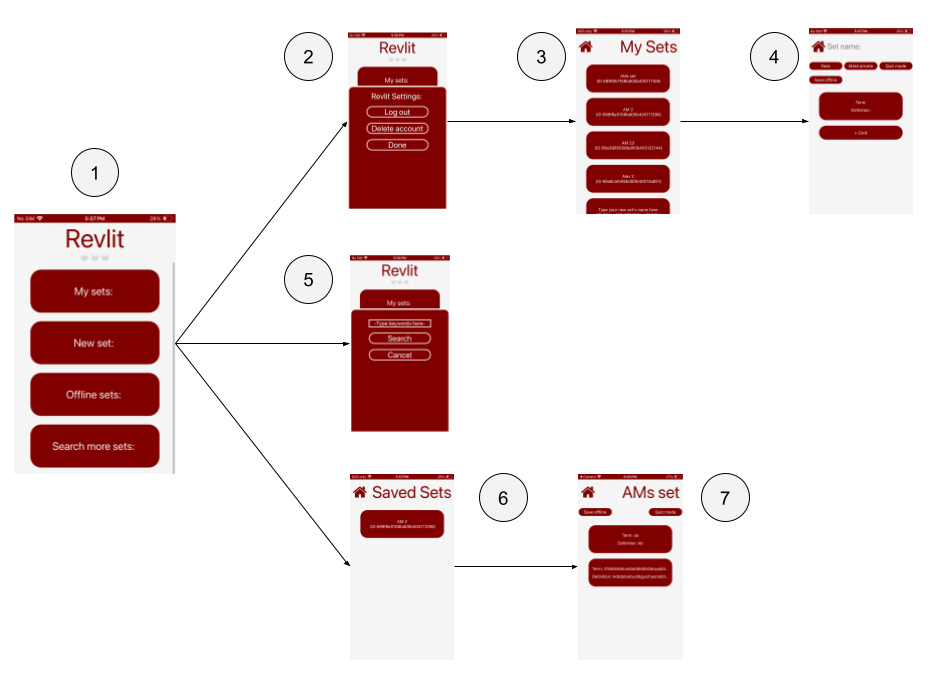
1) This is the main app page of the Revlit mobile app. Here is where every function of the app can be accessed
2) When pressing some buttons, you may be prompted to log in or create an account. Follow the appropriate action for your situation!
3) When pressing 'My sets', a page will load showing your created study sets. If you haven't created any sets yet, this area will be empty (create a new set by pressing 'New set'!
4) When pressing on a set listed under 'My sets', the set viewer will open. Here, you can make changes to your set or enter the interactive quizzer.
5) When pressing on 'Search more sets', a window will pop up asking for search terms. Type in key words for a set you want to find into this window. If any matching sets are available, they will show! If none are available, no sets will show.
6) You can save study sets on your device for offline use. Any offline sets will be available by pressing 'Offline sets' and selecting one of the sets that load. If no offline sets are saved, no sets will show.
Does the Revlit mobile app collect any of my information
Revlit does not collect or store any information besides your username, password, email (for account verification purposes), and all study sets that you create. The developers of Revlit believe strongly in personal privacy, and seek to promote this important right!
See our Terms of Use for more information about Revlit's rules and such!